Stop Grabbing Your Phone Every Time It Beeps: Using AI Automation with Durable Workflows
The modern workplace is drowning in notifications. Workers are interrupted every four minutes on average, with knowledge workers experiencing up to 15 interruptions per hour. Each interruption requires an average of 23 minutes and 15 seconds to refocus, meaning a single notification ding can derail your focus for half an hour. If you’re still managing notifications manually—checking your phone, reading each message, responding individually—you’re sacrificing productivity at an alarming scale.
The solution isn’t to ignore notifications. It’s to automate them completely using durable workflow platforms like n8n, windmill.dev, or AutoKitteh. Without implementing local or Docker-based workflow automation, you’re wasting countless hours every single day.
The True Cost of Manual Notification Management
The statistics are staggering. The average person receives 50-60 interruptions per day, and 80% of those interruptions are unimportant or not urgent. Workers spend an estimated 4 hours of their working day managing interruptions, yet only 3 minutes of every 8 minutes of work yields actual productivity.
When you factor in knowledge work, this becomes catastrophic. A 4.4-second interruption triples the error rate when returning to a task; even a 2.8-second interruption doubles error rates. Across U.S. workplaces, interruptions cost $64.2 billion annually in lost productivity, with distractions accounting for nearly 94% of all productivity loss.
Most critically: 80% of those interruptions don’t matter. If you could eliminate just the unimportant notifications, you’d recover 3 hours and 12 minutes per person, per day in pure productivity.
The Problem with Cloud-Only Solutions
While platforms like Zapier and Make offer cloud-based automation, they come with significant limitations:
- Per-operation pricing that scales with usage
- Limited customization for complex workflows
- Data privacy concerns with sensitive information traversing external servers
- Dependency on third-party uptime for mission-critical automation
Local deployment and Docker containerization solve these problems entirely. When you host workflow automation locally or on your own infrastructure, you gain complete control over data, unlimited scalability without per-operation costs, and the ability to build infinitely complex automations without hitting platform limitations.
The Power of AI-Driven Notification Summarization and Delivery
Imagine this workflow: Every notification, message, email, and alert flowing into your system gets automatically categorized and summarized by AI, then delivered intelligently based on your actual state of availability. Not your status message—your real state: are you walking, driving, actively working, in a meeting, or idle?
This is the paradigm shift that durable workflows enable:
AI Summarization reduces mental fatigue by 40% and helps professionals process information 20-30% more efficiently than manual review. When combined with intelligent delivery mechanisms, you don’t just save time—you eliminate the context-switching problem entirely.
Instead of 50-60 interruptions per day, you could receive a curated summary during:
- Idle moments detected by your phone (no movement, no apps active, no background conversation detected)
- Natural breaks when your desktop shows no IDE, conference apps, or focused work in progress
- Scheduled digest windows (morning, lunch, end-of-day)
- Real-time alerts only for truly urgent items (marked as such by senders)
The workflow handles everything: categorization, summarization, text-to-speech conversion for audio delivery to AirPods, email digests, and podcast-style playback when idle detection confirms you can consume the information.
The Three Platforms: Why You Need Durable Workflows Locally

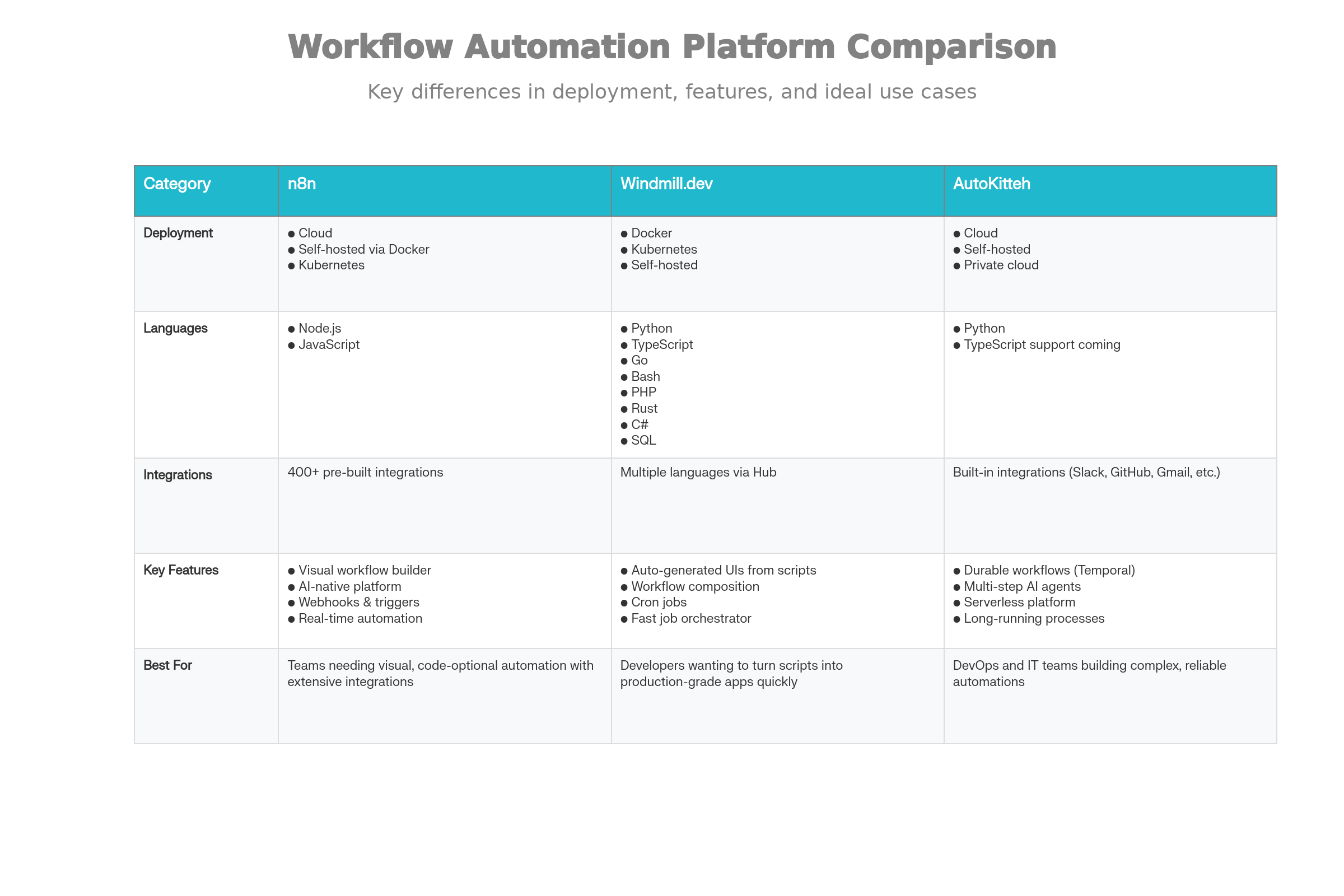
Comparison of Three Leading Durable Workflow Automation Platforms
n8n excels at visual automation with 400+ pre-built integrations, webhooks, and real-time triggers. Its AI-native platform lets you integrate LLMs directly into workflows for categorization, sentiment analysis, and summarization. For notification processing, n8n’s visual interface makes complex routing and conditional logic straightforward—without code.
windmill.dev is purpose-built for turning scripts into production systems. Write a Python script to summarize your notifications? Windmill auto-generates a UI, API, and cron job around it. For teams comfortable with code, this represents the fastest path from script to production—with no DevOps overhead. Its distributed worker architecture scales from zero to infinity across your infrastructure.
AutoKitteh addresses the complexity of long-running, multi-step workflows through durable execution powered by Temporal. If you’re building workflow agents that must reliably handle multi-hour processes (summarizing a day’s worth of notifications, processing them through multiple AI models, formatting for delivery), AutoKitteh ensures zero data loss if a server fails mid-process. The platform literally pauses execution, persists state, and resumes precisely where it left off.
All three support local deployment via Docker, meaning your notification automation runs on your own hardware, private cloud, or self-hosted infrastructure. You control the data, the execution, and the costs.
Real-World Implementation: The Notification Automation Stack
Here’s what an actual implementation looks like:
Phase 1: Collection & Categorization
Webhooks from email, Slack, Teams, and calendar systems feed into your workflow. An LLM categorizes incoming messages: Urgent (requires immediate attention), Important (review today), Reference (archive for later), Noise (discard).
Phase 2: Summarization & Enrichment
AI summarization condenses lengthy email threads, meeting transcripts, and message chains into concise action items. For Slack channels, summarization cuts through 50-message threads down to 3-4 key points. Research shows AI summarization saves professionals up to 4 hours per week, scaling to 12 hours per week within five years.
Phase 3: Intelligent Delivery
Your workflow monitors device state via a custom phone app (detecting: movement patterns, active apps, background conversation via microphone) and desktop app (detecting: IDE foreground, conference calls, focused work). When idle state is confirmed via multiple sensors, the workflow:
- Generates text-to-speech audio from notifications
- Streams directly to your AirPods
- Plays as a “podcast update” summarizing everything you missed
- Logs all items for later review
Phase 4: Archive & Reporting
At day’s end, the workflow emails a daily report digest with all categorized notifications, action items, and summaries. This creates a searchable archive without ever requiring you to check your phone.
Why Workflow Automation Saves 10-50% of Task Time (Conservatively)
The productivity gains from workflow automation are well-documented:
- 73% of IT leaders report 10-50% time savings on tasks after implementing automation
- Workflow automation reduces repetitive tasks by 60-95%, saving up to 77% on routine activities
- 51% of employees spend 2+ hours daily on repetitive work that could be automated
- 88% improvement in data accuracy through automated processes vs. manual handling
But those statistics assume traditional workflow automation. When you layer in AI categorization, intelligent delivery, and idle detection, the savings multiply. You’re not just automating the delivery—you’re eliminating the context-switching overhead entirely.
The average knowledge worker loses 94% of potential productivity to distractions. Even recovering 10-20% of that through intelligent notification delivery is a 4.75-9.5 hour per day productivity gain across a team.
The Docker Advantage: Why Local Deployment Matters
Deploying n8n, windmill.dev, or AutoKitteh via Docker transforms their economics:
- Zero per-operation costs: Scale from 1 workflow execution to 10,000 daily executions with identical infrastructure costs
- Data privacy: Sensitive notification content never leaves your infrastructure
- Customization without limits: Extend platforms with custom nodes, scripts, and integrations without hitting API limitations
- Reliability: Self-hosted ensures your notification system never depends on a third-party’s uptime
A Docker Compose deployment of n8n can be operational in minutes. Windmill deploys in 3 minutes according to users. Both support Kubernetes for enterprise-scale deployments.
The Bottom Line: The Cost of Doing Nothing
Workers are interrupted every 4 minutes. They waste 50-60 interruptions daily on notifications, 80% of which don’t matter. Each interruption costs 23 minutes of refocus time. Distractions cost U.S. workplaces $64.2 billion annually.
But here’s the real issue: if you’re not using automated durable workflows to manage this, you’re making a conscious decision to waste time.
Implementing n8n, windmill.dev, or AutoKitteh locally means:
- No more checking your phone for notifications
- AI-summarized, contextually-relevant updates delivered only when you can actually process them
- 3-9 hours per day of recovered productivity per person
- Complete data control through self-hosting
- Unlimited scalability without per-operation costs
The setup is straightforward. Docker runs these platforms. Your notification sources (email, Slack, calendar, custom apps) connect via webhooks. AI models categorize and summarize. Intelligent delivery ensures you receive information when idle, not when focused. That’s it.
The only question left is: Are you still going to check your phone every time it beeps?
Resources for Getting Started:
- n8n Documentation: https://docs.n8n.io – Deploy in Docker, explore 400+ integrations, build AI-native workflows
- windmill.dev: https://www.windmill.dev/docs – Turn scripts into production systems in minutes
- AutoKitteh: https://docs.autokitteh.com – Build reliable, long-running automations with durable execution
The infrastructure exists. The tools are open-source or affordable. The only remaining variable is your commitment to stop wasting 3+ hours per day on unnecessary interruptions.